WooCommerce plugin — caller identification
The plugin installs into your WordPress and creates a private endpoint from which the phone app fetches customer data at the moment of the call. It recognises guests without an account too — from the order billing phone.
What the plugin does
CallerPeek turns your WooCommerce customer base into a phone book used by the app on your phone. When someone calls, the app asks the plugin about the number, and the plugin answers with a ready-made customer card — the name, the number and value of orders, the status of the last order and a history of earlier calls.
All logic and all data stay on your server. The app is merely a viewer — it does not copy the database, does not sync contacts and sends nothing to us.
Guests without an account are recognised too
In WooCommerce stores a large share of orders is placed without creating an account. The plugin looks the number up among registered customers first, then in the billing addresses of orders — so a caller who bought once as a guest is recognised as well, together with their order history.
Number matching
The plugin compares the last nine digits of the number, ignoring spaces, dashes and brackets. The same customer is found whether the store holds +44 7700 900118, 07700-900118 or 00447700900118. The country prefix comes from the WooCommerce settings and can be overridden in the plugin configuration.
Installation step by step
- Download the plugin ZIP and upload it in the admin: Plugins → Add New → Upload Plugin.
- Activate the plugin. During activation the first device with its own token is created.
- Open WooCommerce → CallerPeek and add one device per phone (for example "Anna", "Front desk", "Warehouse").
- Click Show QR code next to a device and scan it in the CallerPeek app on that phone.
- Done — the app immediately runs a connection test and confirms the pairing with your store.
Installation takes about two minutes and requires no file editing, no database access and no developer.
The plugin panel
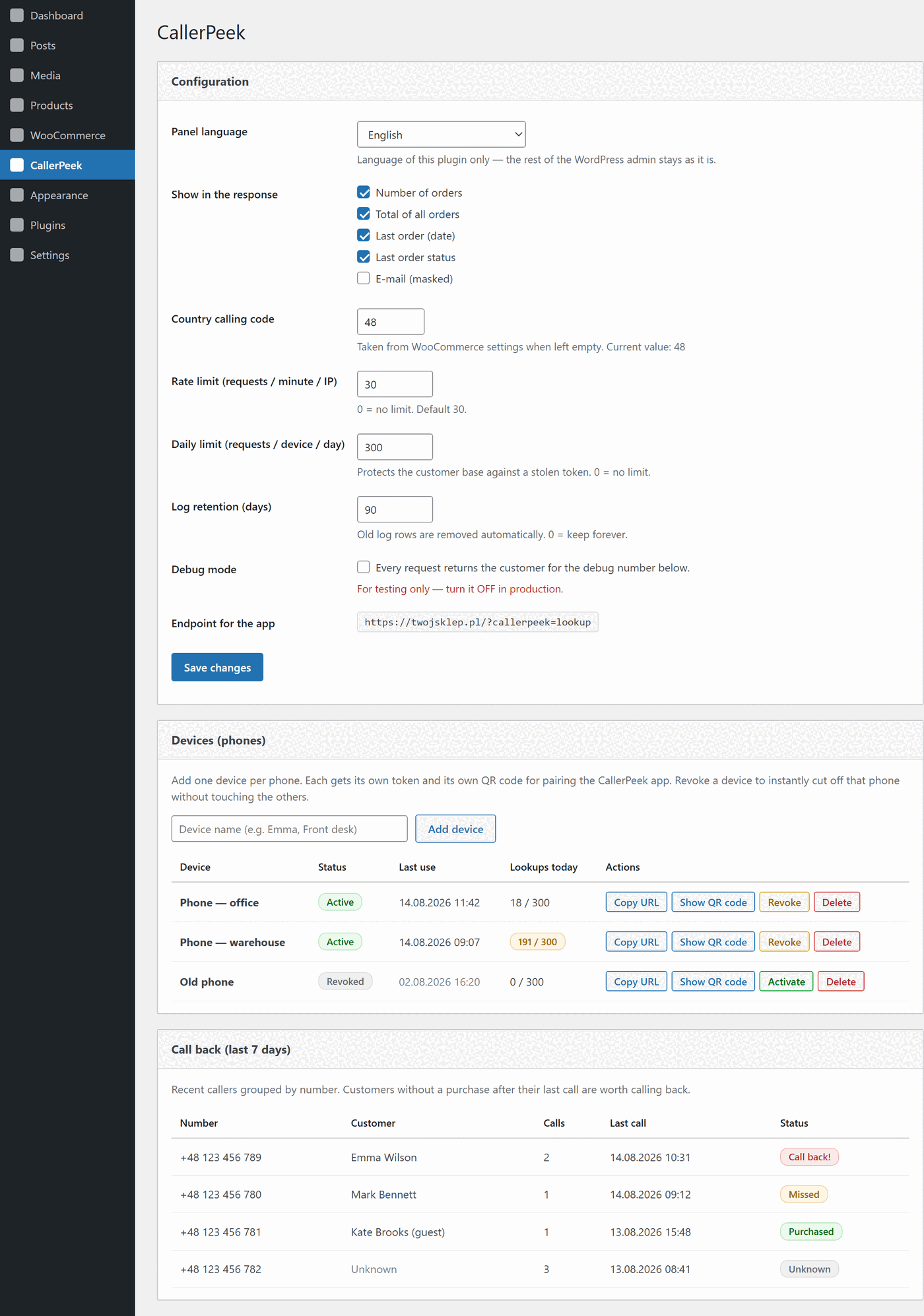
Devices and tokens
A list of phones, each with its own token. For every device you see its status, the time of last use and the number of lookups made today. One click revokes access, regenerates a token or shows the QR code for pairing.
Call back
Callers from the last seven days grouped by number. The app reports whether the call was answered, and the plugin checks whether an order appeared afterwards. Customers marked "Call back!" are the ones who called and bought nothing — the warmest leads a store has.
Call log
The full request history: date, number, matched customer with a link to their profile, device and IP address. The log is purged automatically after a configurable number of days, while the per-number hit history is stored separately and survives log clearing.
WooCommerce compatibility
- HPOS and classic storage — the plugin supports the new order tables (High-Performance Order Storage, default since WooCommerce 8) and the older post-based storage. It detects which one you use; there is nothing to configure.
- Wide version support — WordPress 6.0–7.0, WooCommerce 8.0–10.9, PHP 7.4–8.4.
- No performance impact — the plugin adds nothing to your storefront. Only its own endpoint is called, and only at the moment the phone rings.
- Two endpoint addresses — the classic
?callerpeek=lookupand REST/wp-json/callerpeek/v1/lookup, for installations with unusual permalinks.
Security
- HTTPS only — unencrypted requests are rejected by the plugin.
- A token per device, compared in constant time, revocable instantly from the panel.
- QR code without a token — it carries only a one-time code valid for 10 minutes, exchanged for a token over an encrypted connection.
- Request limit per minute from one IP address and a daily limit per device (300 by default) — blocking bulk extraction of the customer base.
- Visibility — the "Lookups today" column surfaces unusual traffic before it becomes a problem.
Requirements
- WordPress 6.0–7.0 with WooCommerce 8.0–10.9
- PHP 7.4–8.4
- An SSL certificate (HTTPS) on the store domain
- A phone running Android 8.0 or newer
The plugin needs no Composer, no cron jobs and no external services. Server responses are translated into 13 languages, following the language set in the app. The plugin panel itself speaks 13 languages too and has its own switch — independent of the WordPress admin language.
Also running a PrestaShop store?
The same app serves both backends — the API contract is identical. One phone can be paired with a WooCommerce store and a PrestaShop store at the same time, with no extra cost on the app side.